

I’m always hunting for tools that actually work. Tools that don’t force me into someone else’s idea of how I should work. Tools that respect the reality of my day.
For years, I’ve been looking for the right Pomodoro app. And by right I mean one that actually did something other than give you a timer. I found ones that were close—close enough to make me think, “Maybe this one...” So I reached out to the builders. I wrote to them. I said, “Here’s what you need to add. Here’s what’s missing. Here’s what would actually make this useful.”
And nothing happened. This is because most people who build an app don’t actually know what it could do. (Cough, Trello, cough).
So we gave up waiting for other people to build the things we know people need. This year, we decided: stop waiting. Build the things ourselves. Build the tools that match what we actually teach, what we actually know works.
Today, I’m showing you the Pomodoro app we created. Not because we think we invented timers…but because we built something that does what we’ve been telling people to do for years. Focus. So this creates the flows between focused work, self-awareness, and the ability to actually improve how you work.
The Problem With Pomodoros (And Most Productivity Tools)
Here’s what drives me crazy about Pomodoro apps: they track time. That’s it. You set a timer. You work. It dings. You’re done. Excellent you’ve reached 1695 and built the stopwatch. How about we move forward in time a bit?
I mean, what does that timer actually tell you?
Nothing. It runs, it dings. And it tells you “dinger-all” about your work. Nothing about your capacity. Nothing about what’s getting in your way. It’s just a timer that makes you feel productive. … not effective.
We’re going for effective.
I use Personal Kanban every day, you all know this. But it’s part of my system. It’s the part where I visualize my work because invisible work kills everything. It drains you. It makes you second-guess yourself. You finish an eight-hour day and think, “What the hell did I actually do?”
When we focus and finish, we need to focus.
What if a Pomodoro app actually helped you see what you’re doing? What if it connected focus time to insight? What if deep work had a repeatable pattern? What if flow could be scheduled?
So, that’s what we built.
How Modus Pomodoro Works
Let me walk you through the my workflow, mostly because I’m still shocked that this worked as well as it did.
First: your Kanban board. You’ve got your pending work. You’ve got your active work. You’ve got your “well of commitment” … your annoying backlog that keeps growing no matter how much you complete.
So you go to your Personal Kanban and you want to focus. You don’t just grab whatever’s on top. You think about it. You sort it. And not by arbitrary priority lists. By what the work actually is.
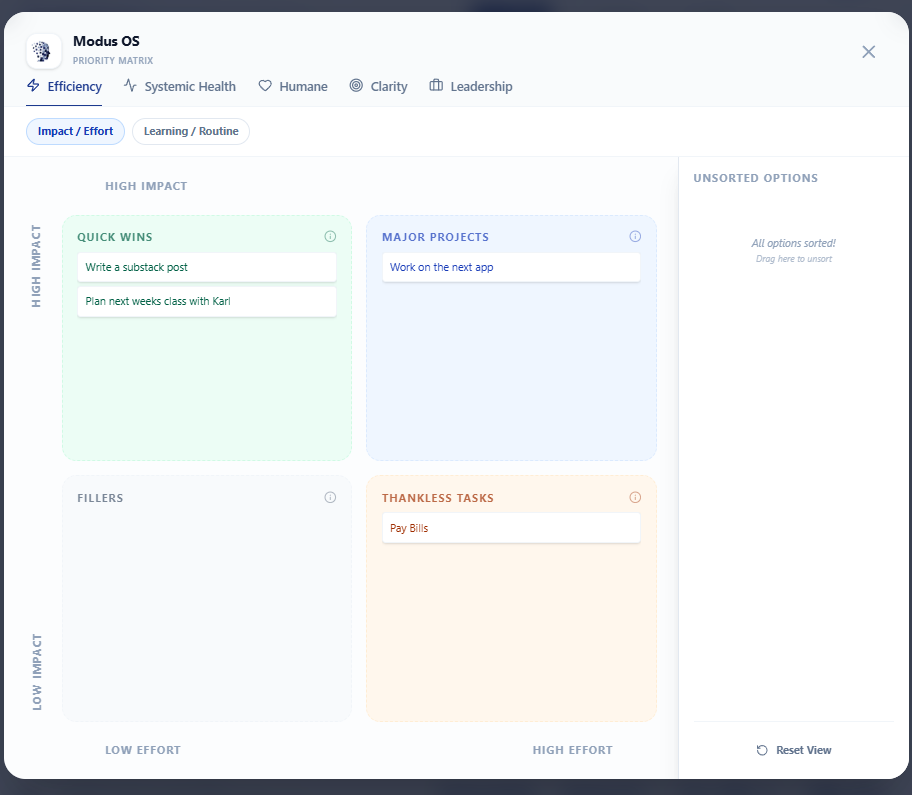
So we built this in a way that lets you take those things you are going to focus on and drop them into different contexts.
You want to understand what is actually happening with your work. Is this work a heavy lift but a quick win? Then you know you can knock it out in a focused sessions with a colleague.
Is this flow state? The kind of work where you lose yourself for 25 minutes and forget to check Slack? Mark it and protect that time, use it as a reward.
Is this supported delegation? Work that needs someone else’s input or feedback? That tells you something important about your capacity.
Is this thankless work? Important but stuff nobody celebrates? At least now you can see it. You can see it in context.
This is what changes everything. Context.
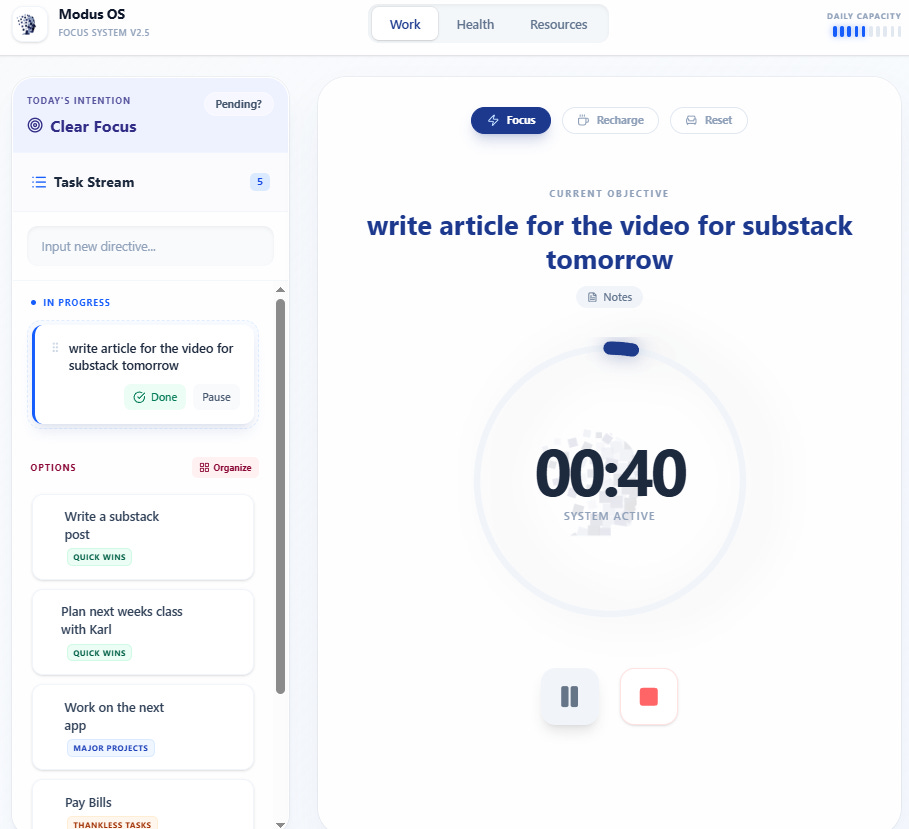
Now here in this view you see your tasks and their contexts. You’re not just marking down “contact new students” or “taxes and licensing.” You’re noting: Why is this here? What does it actually mean for how I work? What kind of energy will it take?
Once you’ve sorted your work with that clarity, you pull one thing into your focus zone. Just one thing and you do a Pomodoro all Francesco Cirillo style.
The Pomodoro Itself
You start the timer. 25 minutes. The app doesn’t do anything fancy here. It just gets out of your way. You work.
When I’d do this in the other apps, I’d just work, but I couldn’t track anything. So with ours, you can take notes. But here’s the part that matters: as you work, you can take notes. You need to remember what you’re learning or discovering or what’s changed between when you started and where you are now.
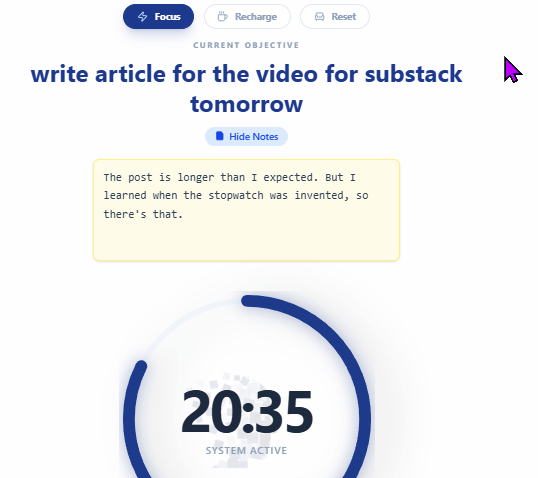
With this we are building memory. You’re creating the story of your work.
Twenty-five minutes later, the timer ends. You enter your energy level (you’d like to spend a day not burning out) and anything that interrupted you. Then the Modus Pomodoro tells you to:
“Get up and walk around.”
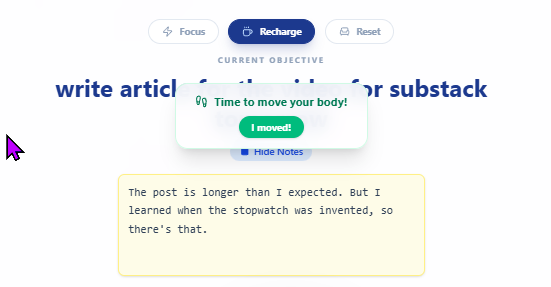
The thing about Pomodoro is that your brain needs to process and we never give ourselves time for processing. When you work for 25 minutes straight, your short-term memory gets maxed out. You need those five minutes, not necessarily to rest, but more to to consolidate what you just learned. To move it from your working memory into something more permanent. You need to actually remember your life.
Every Pomodoro app glosses over this. Just like Trello glosses over WIP limits. But this is real neuroscience. When you skip this, you get to the end of your day (or your week) and you can’t remember what you did. The work disappears into fog. You may as well not be even trying to improve.
So, with this … I tell you (and I tell myself) to get off your butt and walk around.
What Happens Next: The Insight
After your break, you come back. Then you move on to the next thing.
Other Pomodoro apps just were like Yeah! Productivity! and you just moved on to the next task. But I wanted to build a picture of how I work.
You’ve completed some Pomodoros. Your energy averaged 7.5 out of 10. You had some friction. Maybe some context switching, maybe missing information. The app gives you stats over your day. So by the time you complete you have an idea of:
Your actual capacity (how many Pomodoros you can sustainably do)
Your energy patterns (when you’re strongest, when you fade)
Your drag profile (what gets in your way most)
Your completion rate (did you finish what you said you would?)
You have tons of context.
So, Why and Stuff
We teach people that invisible work kills you.
We teach Personal Kanban because visualization is power. You can’t improve what you can’t see.
We teach Personal Kanban because the moment you see your capacity and work within it, you start making real choices about what you can promise and what you cannot.
We teach Pomodoro because focus is a skill you acquire through practice. We don’t naturally avoid email and doomscrolling.
How to Use the Alpha
We’ve built this as an alpha…a New Year’s gift, honestly, for people who are tired of tools that don’t let them focus.
Go to pomodoro.modusinstitute.com.
Start a session. Work on something that matters. Actually focus on it. Take notes. Log your energy. Let the app see your patterns.
Then come back and tell us what you think. Tell us what breaks. Tell us what actually helps. Tell us what we’re missing.
P.S. We’re building more of these tools this year. Tools for focus. Tools for clarity. Tools to help us get things done in a constant shark tornado of distraction. If there’s something you’ve been waiting for someone to build—something that would make your work visible and meaningful—tell us. Maybe we’ll build that next.
Try the Pomodoro App: pomodoro.modusinstitute.com
Want to go deeper? Check out Personal Kanban and our courses on visual management.


